For Students
Have you ever wondered, "What happened on the day I was born?". In this project you will discover many answers. But first, a little fun...

 A Day You Were Born greeting from the Beatles can be heard by clicking on the speaker.
In this project you will see instructions for what to do AFTER you click on certain links.
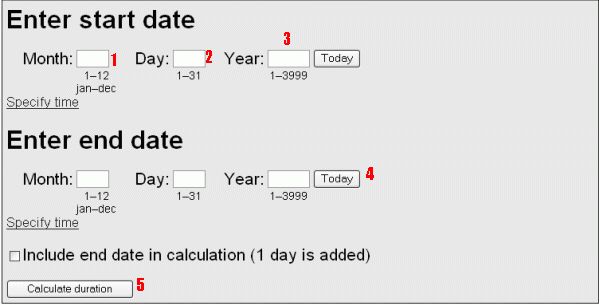
For example, the first project section shows you what you will see on the website you will visit, such as this:
We'll give you instructions on what to do when you reach the website, such as:
You will type in the Month (1) Day (2), and Year (3)you were born. Then you can simply click on Today (4) and then Calculate duration (5)
You will record your information in the project handout,
Next, you'll always see a photograph of a mouse, which leads you to click on a certain link, such as:
Click on the mouse to see how old you are in days:
 http://www.timeanddate.com/date/duration.html
We took out the links here so you won't be tempted to click on them but you WILL click on them while completing the project.
After you record your information in the project handout you will need to click the browser back button to return to the project.
If you can't find the information you need you will click on the question mark below to search the Internet:
 Can't find what you need for this section of the project? Click Here.
Again, we took out the link in the question mark and the text here but it WILL work while you are working on the project.
Then, we'll share some fun or interesting audio or video sounds or images, such as:
Click on the speaker for a bit of humor about this progect.
And at the end of each project page you will see a link which leads you to the next page of the project. Let us begin now by clicking the link below: